
Set up shipping
Google needs a shipping rate and a delivery time for every country you sell to. Products without shipping for a country are disapproved there. Feeden can copy the rates you already set in Shopify to Merchant Center, so you don’t have to type them twice.
How shipping sync works
Section titled “How shipping sync works”- Feeden reads your Shopify shipping profiles — the General profile and any custom profiles — for each country one of your active feeds targets.
- It creates matching shipping services in Merchant Center named “Feeden – …”, and converts rates to the currency of each Shopify Market.
- When you change shipping in Shopify, Feeden updates Merchant Center automatically. It also re-checks every night (see Settings → Schedule).
- Shipping services you created yourself in Merchant Center are never changed or deleted. Feeden only manages the ones it created.
Turn on shipping sync
Section titled “Turn on shipping sync”-
Make sure Google Merchant Center is connected and you have at least one active feed. Feeden syncs shipping only for countries your feeds target.
-
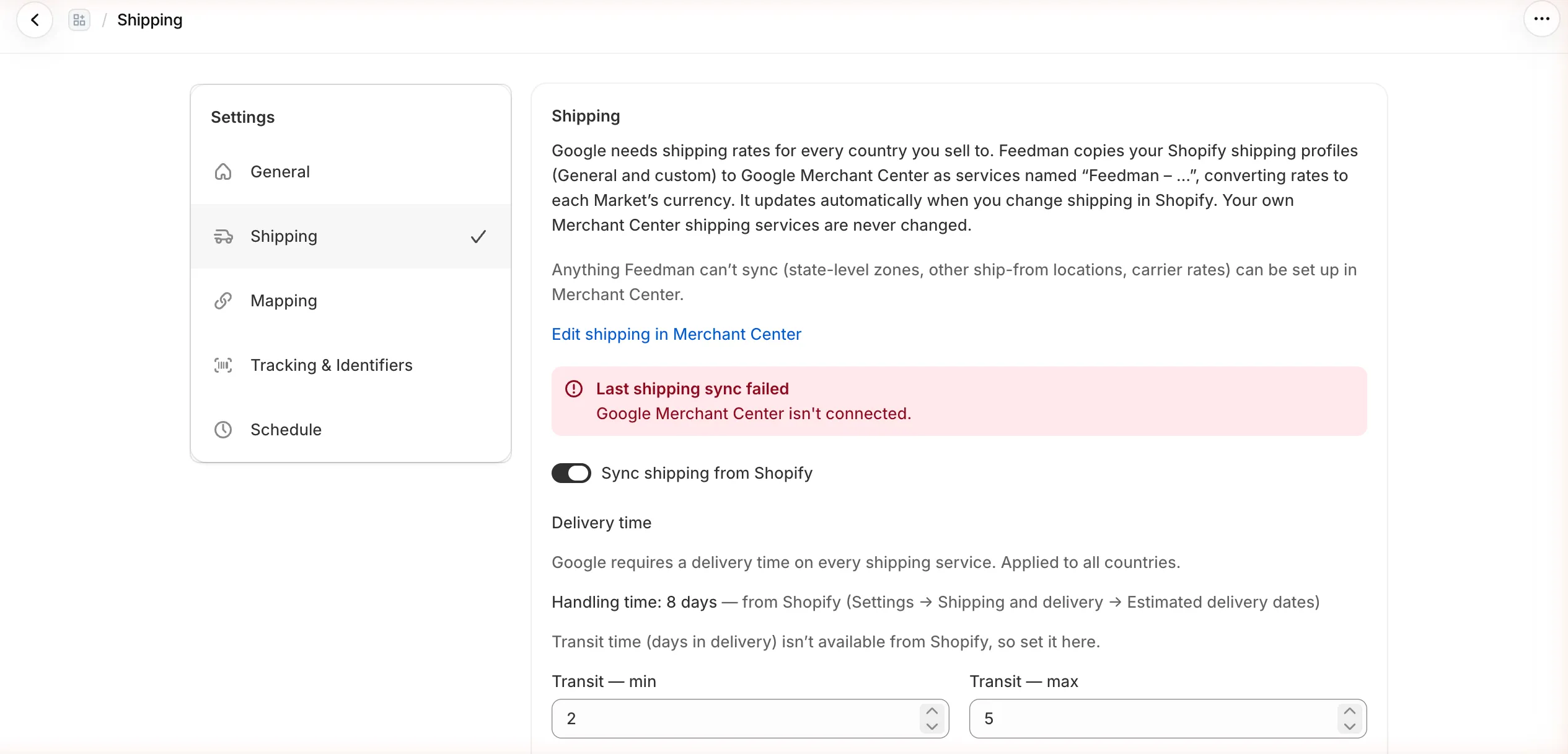
Go to Settings → Shipping and turn on Sync shipping from Shopify.
-
Set the Delivery time (see the next section).
-
Select Save in the bar at the top of the page.
You’ll see “Shipping settings saved — syncing to Google”. A few seconds later, the Countries list shows the result.
Delivery time
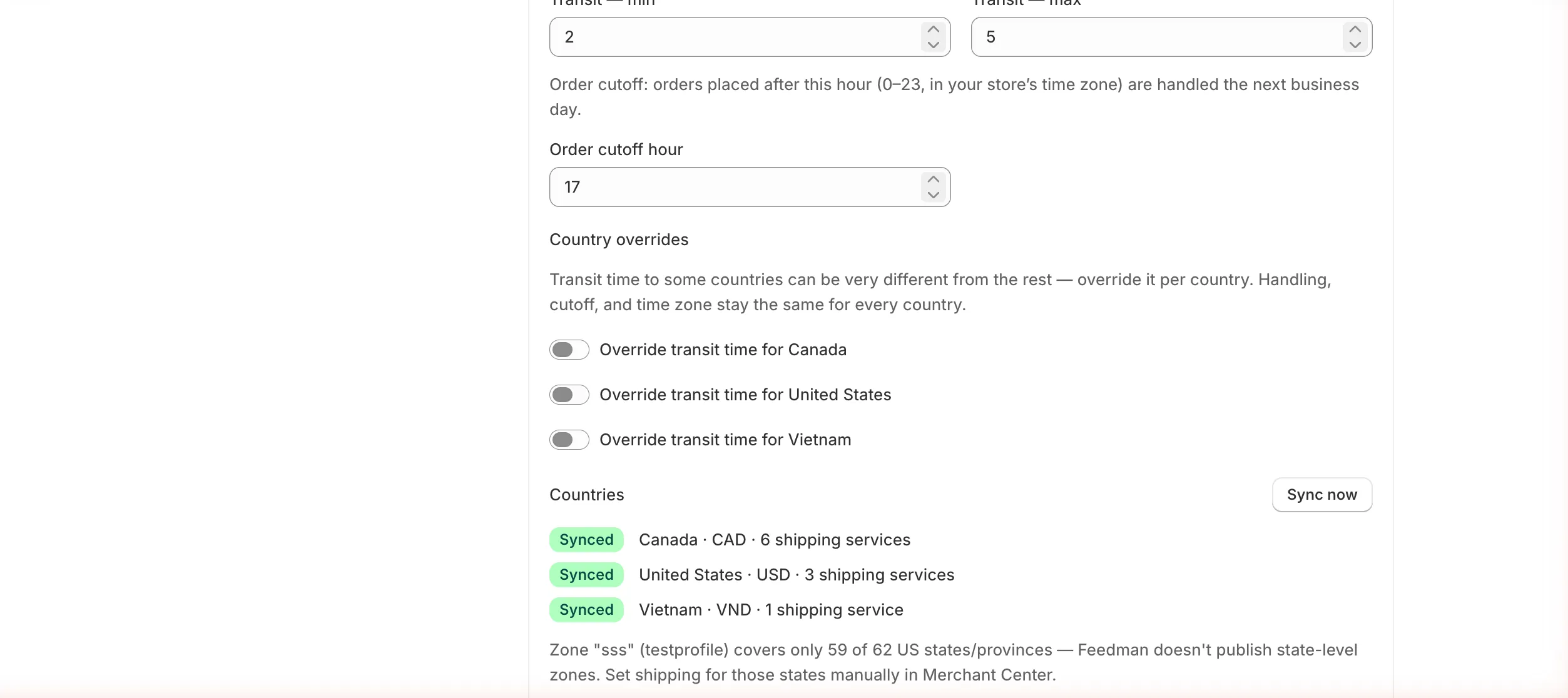
Section titled “Delivery time”Google shows shoppers an estimated delivery date, so every shipping service needs one. Delivery time = handling time (days before the order ships) + transit time (days the carrier takes).
| Setting | Where it comes from | Default |
|---|---|---|
| Handling time | Read from Shopify if you use Estimated delivery dates (Shopify: Settings → Shipping and delivery → Estimated delivery dates). Otherwise set Handling — min and Handling — max here. | 0–1 days |
| Transit — min / max | Always set here — Shopify doesn’t store transit times. | 2–5 days |
| Order cutoff hour | Orders placed after this hour (0–23, in your store’s time zone) are handled the next business day. | 17 (5 PM) |
When Feeden reads handling time from Shopify, the page shows it as, for example, Handling time: 8 days — from Shopify, and the handling fields are hidden.
Example. You ship within 1–2 business days and use a carrier that delivers in 3–5 days inside the US. Set Handling 1–2 and Transit 3–5. Google shows shoppers “Delivery in 4–7 days”.
Country overrides
Section titled “Country overrides”Transit time to some countries can be very different — for example 2–5 days in the US but 7–14 days to Vietnam. Turn on Override transit time for [country] and enter that country’s own min and max. Handling time, cutoff and time zone stay the same for every country.
Check the result
Section titled “Check the result”After each sync, the Countries section lists every country your feeds target:
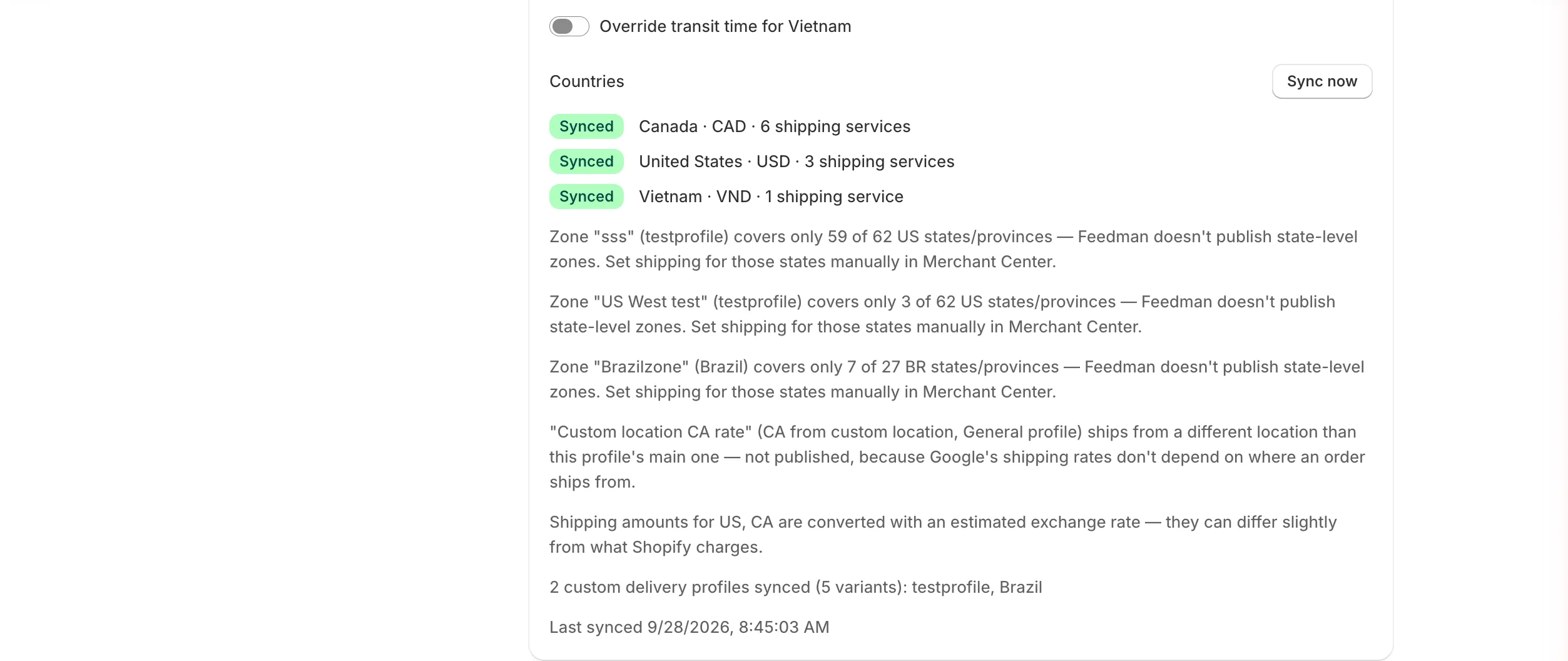
- Synced — Feeden published the country’s services, for example
Canada · CAD · 6 shipping services. - Skipped — nothing was published for that country. The reason is shown next to it (see below).
- The notes underneath explain rates that were left out on purpose.
- Last synced shows when the sync finished. Sync now runs it again immediately.
What Feeden syncs — and what it doesn’t
Section titled “What Feeden syncs — and what it doesn’t”| Shopify setup | Synced? | Notes |
|---|---|---|
| Flat rates (e.g. Standard $5.99) | Yes | |
| Free shipping rates | Yes | Published as a $0 rate. |
| Rates based on order price (e.g. free over $50) | Yes | Published as price tiers. |
| Rates based on order weight | Yes | Published as weight tiers, in kilograms. |
| Custom shipping profiles | Yes | The note lists them, e.g. “2 custom delivery profiles synced”. |
| Carrier-calculated rates (UPS, FedEx, apps…) | No | “Carrier-calculated rate — no fixed price to publish”. Set up carrier-calculated rates in Merchant Center. |
| Zones covering only some states/provinces | No | Google’s shipping is per country. Set state-level rates manually in Merchant Center. |
| Rates for another ship-from location in the same profile | No | Google’s rates don’t depend on where an order ships from. Feeden uses the profile’s main location. |
For anything Feeden doesn’t sync, select Edit shipping in Merchant Center at the top of the page and add it there. Feeden won’t overwrite it.
Why a country is “Skipped”
Section titled “Why a country is “Skipped””| Reason shown | Fix |
|---|---|
| No Shopify shipping zone covers this country | In Shopify, add the country to a shipping zone (Settings → Shipping and delivery). |
| No enabled Shopify Market covers this country | In Shopify, enable a Market that includes the country (Settings → Markets). |
| Can’t convert [currency] rates — no priced product for this country yet | Feeden needs at least one product with a price in that Market to learn the exchange rate. Wait for the catalog sync to finish, or check the Market’s pricing. |
| No shipping service was created | All of the country’s rates were carrier-calculated or had unsupported conditions. Add a flat rate in Shopify or set shipping in Merchant Center. |
Troubleshooting
Section titled “Troubleshooting”“Connect Google Merchant Center to sync shipping.”
Section titled ““Connect Google Merchant Center to sync shipping.””Shipping sync needs a connected account. Connect it, then select Sync now.
“Last shipping sync failed”
Section titled ““Last shipping sync failed””The red banner shows Google’s reason under the title. The most common is “Google Merchant Center isn’t connected.” — reconnect in Settings → General, then select Sync now. The banner disappears after the next successful sync.
“Turn on shipping sync first.”
Section titled ““Turn on shipping sync first.””You selected Sync now while the switch is off. Turn on Sync shipping from Shopify and save.
Validation errors when saving
Section titled “Validation errors when saving”| Message | Fix |
|---|---|
| Delivery days must be whole numbers between 0 and 365. | Use whole days, no decimals. |
| Each minimum must not exceed its maximum. | Min must be less than or equal to max. |
| Order cutoff hour must be a whole number between 0 and 23. | Use 24-hour time, e.g. 17 for 5 PM. |
Products still say “Missing shipping” in Merchant Center
Section titled “Products still say “Missing shipping” in Merchant Center”Google re-evaluates products a while after shipping changes, often a few hours. If it persists, check that the product’s feed country is Synced in the list above, and that your Merchant Center shipping service covers the product’s delivery area and currency.